

What the Instagram MCP can do
Ask in ordinary words — your agent gets to the media, the account that posted it and the audience around it
-
Instagram profile
Bio, follower and post totals, plus verified and business flags.
-
Username search
Find the right account by name when you cannot recall the exact username.
-
Posts and reels
Recent posts and reels from any public account, captions and media included.
-
Post by link
A single post, reel or carousel — all slides, the caption and the author.
-
Comments
Everything written under a post or reel, together with authors and dates.
-
Likes
Which accounts liked a post or reel, with names and profile pictures.
-
Followers
The full follower list of an account, fetched page by page.
-
Following
Everyone an account follows, fetched page by page.
-
Active stories
Whatever an account has live at this moment, before it disappears.
-
Story by link
One story with its media, its author and its expiry time.
-
Highlights
Saved collections along with every story stored inside them.
-
Video download
Direct links to the video inside a post, reel or IGTV — no watermark.
A single MCP for the whole of Instagram
The same set of tools answers from a chat client, a code editor or your own scripts — reels, photos, videos, carousels, stories and highlights.
Download Instagram reels and videos
Public contentA single block in your client’s config is all the setup there is — after that you simply ask for media in plain words.
{
  "mcpServers": {
    "instasupersave-mcp": {
      "type": "http",
      "url": "https://api-wh.instasupersave.com/instagram/mcp"
    }
  }
}Grab the video from this reel instagram.com/reel/… and tell me what its caption says
download_instagram_video(url="instagram.com/reel/…")
Saved the reel at 1080×1920. Its caption says “morning run”.
Should I pull the cover image separately too, or the account's other recent posts?
Connecting the Instagram MCP to your tool
Choose your platform and walk through the steps
Fits any MCP-capable client · only the path to the config file changes.
-
Open the MCP settings of your client and locate its config file — normally
mcp.json. -
Register InstaSuperSave inside the
mcpServersblock:{ "mcpServers": { "instasupersave-mcp": { "type": "http", "url": "https://api-wh.instasupersave.com/instagram/mcp" } } } - Save the file and restart the client so the server gets picked up.
-
Now ask for something in a chat:
- Save the video from this post: instagram.com/p/…
- Pull every story this account has live right now
An ordinary ChatGPT account will do · Developer mode has to be enabled in the settings.
- Open chatgpt.com and sign in.
-
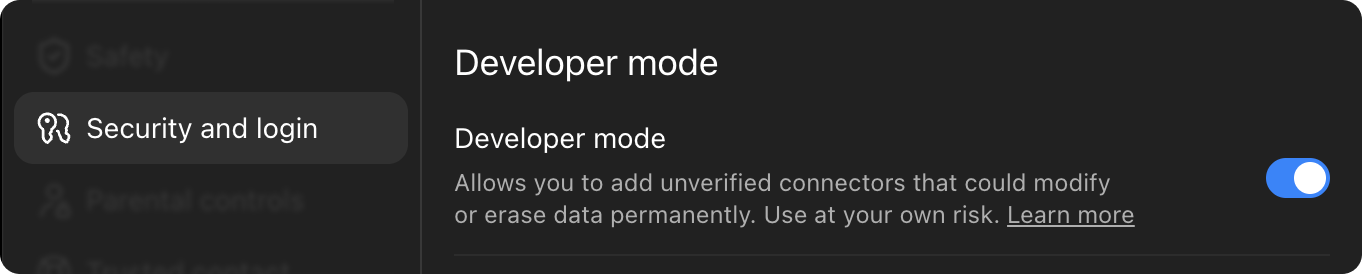
Head to Settings → Security and login, locate Developer mode and turn it on.
- Leave the settings and open the plugins page: chatgpt.com/plugins
-
Click the + button in the upper right corner and pick Create plugin. In the window that opens, click Create MCP application.

-
Paste this address into the field:
https://api-wh.instasupersave.com/instagram/mcp - Choose OAuth for authentication and hit Connect (or Sign in).
- A sign-in window appears — log in or register, then grant access.
- That is it. In any chat, open the tools icon and enable InstaSuperSave.


Simply ask the assistant for what you want — it reaches for the tool on its own when the request calls for it.
Works on any Claude plan · the free one allows a single custom connector.
- Open claude.ai and sign in.
- Click your name at the bottom left → Settings → Connectors.
-
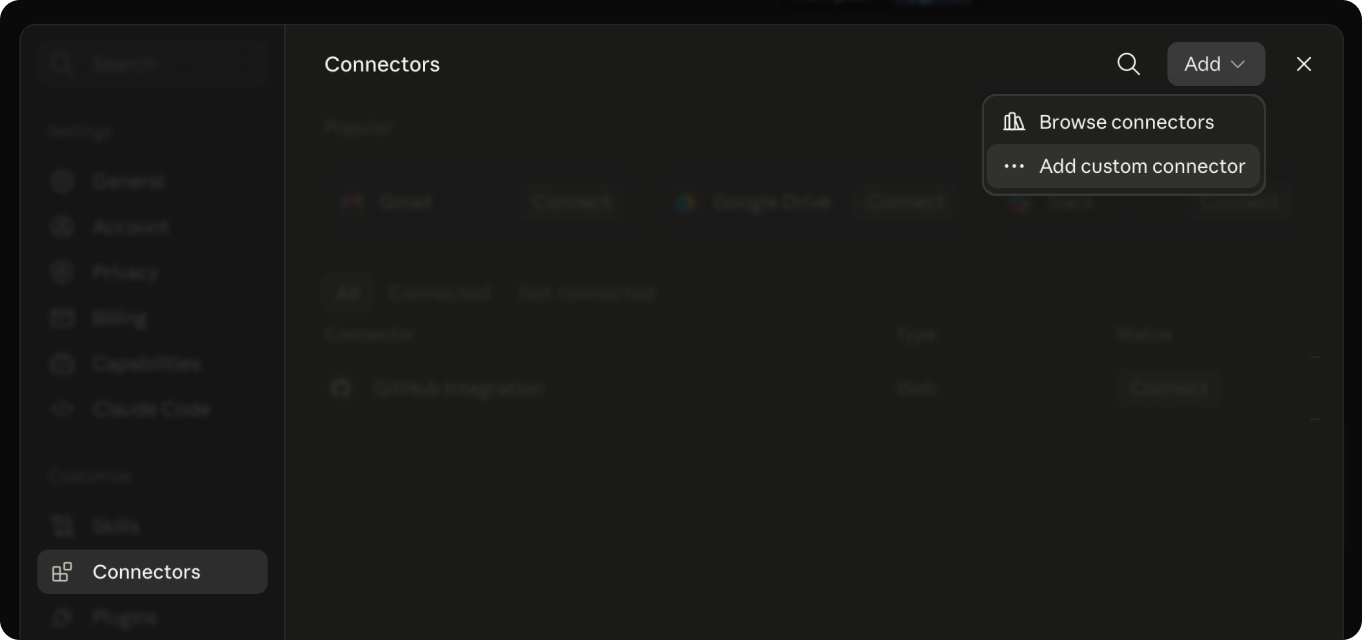
Pick Add custom connector.
-
Paste the address and press Add:
https://api-wh.instasupersave.com/instagram/mcp - Press Connect — a sign-in window opens. Log in or register, then grant access.
- Back in the chat, click the tools icon below the message box and enable InstaSuperSave.

Connector missing? Refresh the page, then make sure it is enabled in the chat's tool list.
The Windows or macOS app · the free plan allows a single custom connector.
- Install the Claude app, open it and sign in.
- Go to Settings → Connectors.
-
Pick Add custom connector.
-
Paste the address and press Connect:
https://api-wh.instasupersave.com/instagram/mcp - A browser window opens for sign-in — log in or register, then grant access.
- Switch back to the app — InstaSuperSave shows up among the tools. Done.
Keep the app updated — custom connectors only work in newer versions.
Terminal · with Claude Code installed.
- Install Claude Code and sign in, following the prompts it shows on first launch.
-
Run this add command in your terminal:
claude mcp add --transport http instasupersave-mcp https://api-wh.instasupersave.com/instagram/mcp -
Launch Claude Code and enter
/mcp. - Select instasupersave-mcp and press Authenticate — a browser opens for sign-in.
- Log in or register, grant access, then return to the terminal.
- Done. Now just ask the assistant for whatever you need.
The instasupersave-mcp part is just a label in your own server list — rename it to whatever suits you.
Ran into trouble?
- The sign-in window does not open, or authorization fails. Let pop-ups through in your browser and try connecting once more.
- The tool went quiet or vanished. Delete the connector and add it back at the same address.
- No Connectors section in sight. Update the app or reload the page — older versions do not have it yet.
- The session expired. Often a fresh sign-in is all it takes — press Authenticate or Connect again.
One key, everything unlocked
50 free requests to see how it works — no card needed. Start free-
Pro
$50.00 /mo
What you get:
- 50,000 requests a month
- Fixed cap — no unexpected overage charges
- Proxy bundled in
- Full MCP access
-
Most popular
Ultra
$150.00 /mo
What you get:
- 250,000 requests a month
- Fixed cap — no unexpected overage charges
- Proxy bundled in
- Full MCP access
-
Mega
$250.00 /mo
What you get:
- 1,000,000 requests a month
- Fixed cap — no unexpected overage charges
- Proxy bundled in
- Full MCP access
Ask for a payment link right in the chat where InstaSuperSave is connected — ChatGPT, Claude or any other client — and your assistant will fetch one for you.
Need a bigger volume? Get in touch about a custom plan.
Frequently asked questions
What you need to know about connecting InstaSuperSave to an AI agent.
-
Model Context Protocol is an open standard that links AI assistants to outside tools and data. A server publishes a set of tools, and the assistant decides for itself when to call them.
-
Any client that speaks MCP. The setup section above walks through ChatGPT and Claude — web, desktop app and Claude Code — and adds a universal config for everything else.
-
No. Only content that is publicly available can be fetched, exactly as on the website.
-
The data is the same, the consumer is not. The REST API serves code you write yourself; MCP serves an agent that works out on its own when something needs downloading.
Ready to give it a go?
Hand the downloading to your AI agent — the MCP connects in a couple of minutes and works from the platform you already use.
- Original quality, watermark-free
- Reels, photos, videos, stories
- Nothing for you to maintain